 EN
EN
ICLOUD
Sync (and backup) your notes with iCloud
You can now sync and backup your notes with iCloud, which is totally free: Any Mac comes with a free iCloud account (with 5GB). Up to 50GB are usually around 1 dollar, find the current prices here on Apple's website.
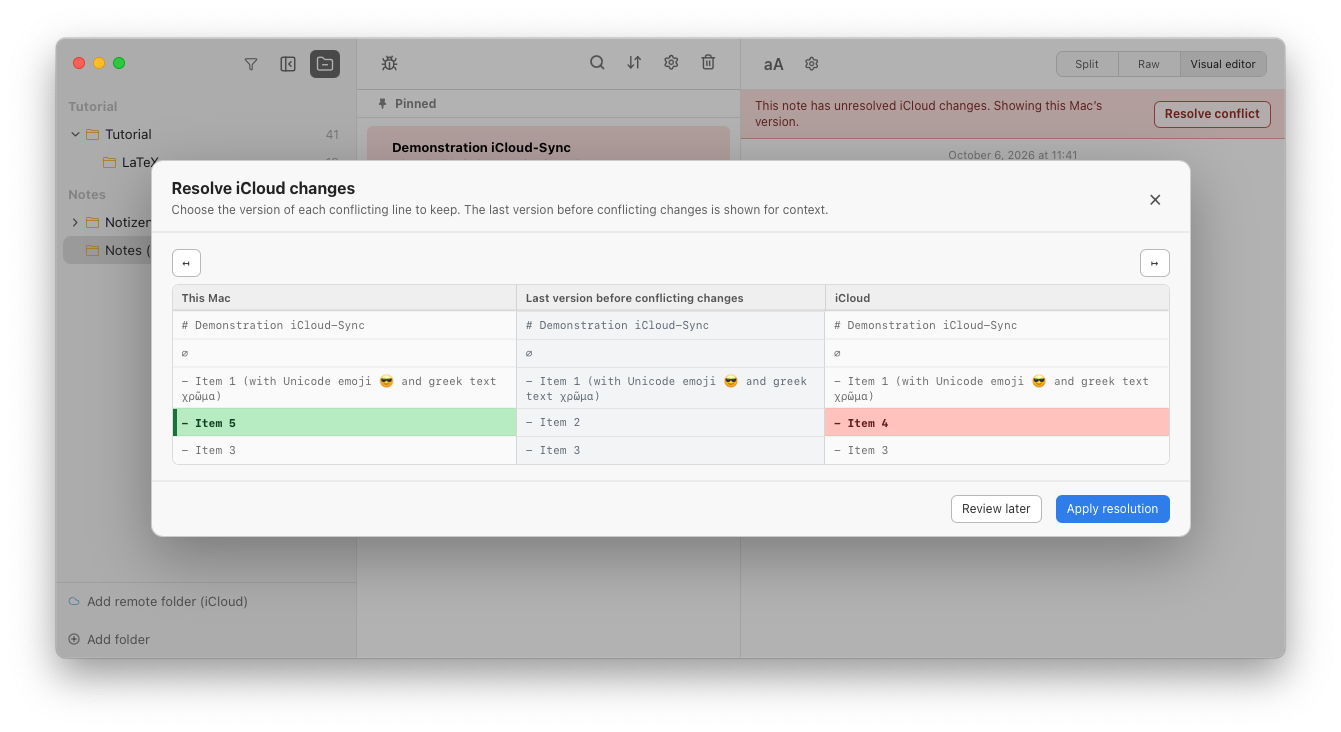
Notes Plus can now save your notes into you private iCloud account with just one click: Right-click a root folder (the top folder, not a subfolder) in the left lane, click "Add to iCloud", that's it. On another device, click the "Add remote folder (iCloud)" button in the bottom of the left lane, and chose the one you want. You now have the "same" folder on two different computers, and any change on one will be synced within 1-2 MINUTES to the other (be patient! ;)). In cases of conflicts due to parallel edits, a conflict-resolving screen will show.
Tags, priorities, favorite status, pinned status and even attachments like images will be synced too! Find more sync options and the possibility to remove everything from iCloud inside the middle lane gear icon (settings menu).
TODO: proper explanaition and documentation will follow in the next days!
How conflicting data is fixed
If two devices edit the same note at the same time, a conflict-resolving screen will show. Usually this will not happen, as you probably edit notes on different devices at different times, and in the meantime they have already synced.
But what if not? Even then, Notes Plus will recognize your edits are conflicting, and show a windows asking you what to do; This screen will show you the note as it was before the conflict, the note as it is on iCloud, and the note as it is on this device. You can then choose line-by-line, which version to keep, or just accept the changes from one side by clicking the left/right arrow on the top of each side.